

When your business runs on a SQL Server database, or any database for that matter, you need a clear plan to keep data safe and services available.
Backups, High Availability (HA), and Disaster Recovery (DR) are related but not interchangeable. Understanding what each one does (and doesn’t do) helps you build the right mix.
This post breaks down the three layers and how they fit together.

Backups are your safety net
A backup is a copy of your data taken at a point in time. If something goes wrong with your database, you can restore your data from the time it was taken. In principle, it’s quite simple, but complexity comes in the details.
SQL Server gives you three main backup types:
Full backups
Full backups capture everything in the database at that moment. They are the foundation of any backup strategy, but they can be large and take time to run.
Differential backups
Differential backups capture only what has changed since the last full backup. They are faster and smaller, which makes them useful for daily or more frequent runs between full backups.
Transaction log backups
Transaction log backups capture the log of every change made to the database. These are the most granular option and allow you to restore to a very specific point in time, not just the moment a backup was taken.
Backups protect you from data loss. For example, if something has been accidentally deleted, a corruption, or a failed update. A backup is how you get that data back.
Two key questions with backups are:
- How frequently should you take them?
- How long should you keep them?
The answers to these questions are dependent on two things:
- Recovery Point Objective (RPO): how much data you can afford to lose when a disaster strikes?
- Recovery Time Objective (RTO): how long you can afford to be without the service?
Backups alone will not keep your system running during a failure. Restoring from a backup takes time, so if your RPO and RTO are just minutes or even seconds, you need more than a backup strategy.

High Availability keeps things running
HA is about minimising downtime. Rather than recovering from a failure after it happens, HA solutions are designed to keep your system available during a failure. For example, by switching over to a working copy fast enough that users barely notice.
SQL Server Always On Availability Groups
Always On Availability Groups lets you maintain one or more secondary copies of your database on separate servers, in real-time. If the primary server fails, one of the secondary servers takes over. Depending on how you have it configured, this failover can be automatic and can happen in seconds.
Failover Cluster Instances
Failover Cluster Instances (FCI) work differently. Instead of keeping separate copies of the data, multiple servers, or ‘nodes’, share the same storage. If the active node fails (or is shut down due to planned maintenance), another node in the cluster takes over. This protects against server failure but not against storage failure, because the storage is shared.
These HA solutions replicate all your data, including mistakes. If someone mistakenly deletes live data, that deletion gets replicated to your secondary copies almost immediately. HA works well alongside backups, rather than replacing them.
Disaster Recovery plans for the worst
Backups are usually a core part of DR, but DR goes beyond “having backups”. DR is the overall capability to recover systems after a major incident. This could be a fire, a flood, a major power failure, a ransomware attack, or anything else that makes your primary infrastructure unavailable.
Backups in a Disaster Recovery plan
- Store at least one copy of backups offsite (or in a separate cloud account/subscription) to survive a site-wide outage.
- Protect backups from ransomware and accidental deletion (for example: immutable storage, retention locks, and restricted admin access).
- Regularly test restores to prove you can meet your RPO/RTO (and to catch missing log chains, corrupt backups, or undocumented steps).
How SQL Server supports Disaster Recovery
SQL Server doesn’t have a single “DR button”. Instead, DR is built from a combination of features (plus process) that help you maintain a recoverable copy of data elsewhere and bring services back within agreed targets:
Always On Availability Groups
As mentioned, Always On Availability Groups can include secondary replicas hosted in a different data centre or in the cloud, keeping a synchronised or near-synchronised copy of your database offsite.
Log shipping
Log shipping is a simpler option that automatically sends transaction log backups to a secondary server on a schedule. It is less sophisticated than Always On Availability Groups but easier to set up and can be effective for less critical systems.
Database mirroring
Database mirroring is an older feature that keeps a secondary copy of a database in sync. It has been deprecated in newer SQL Server versions and is largely replaced by Always On Availability Groups.
A DR plan also covers who does what during an incident, how you communicate with staff and customers, how you test that your recovery works before you need it, and how you get back to your primary environment once the crisis has passed.
How backups, HA, and DR work together
All three solve different problems, and most organisations need them all in some form:
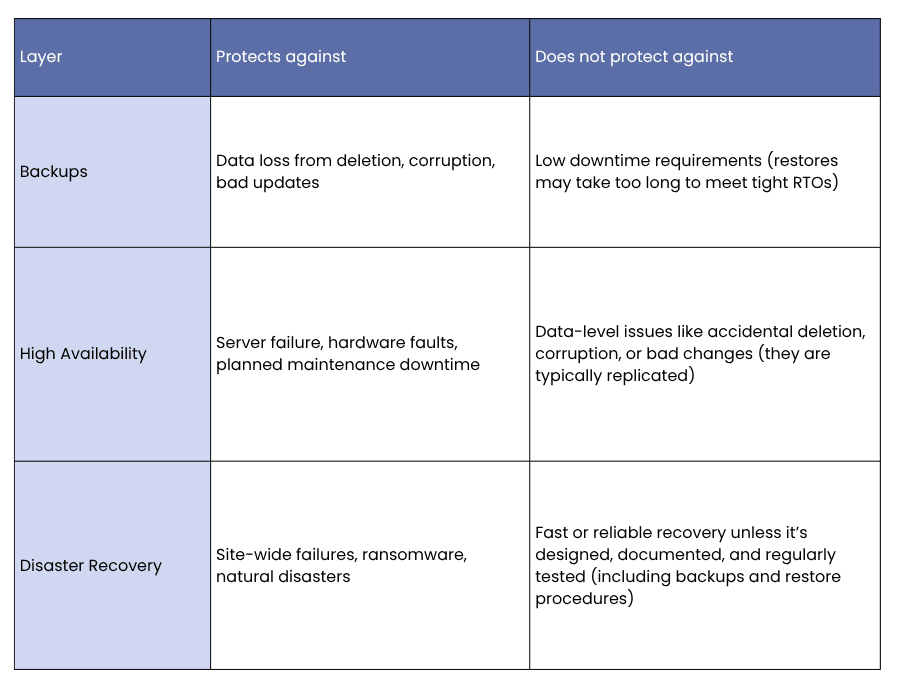
A sensible SQL Server protection strategy uses all three layers: regular backups with tested restores, HA for keeping systems available day to day, and a DR plan for if something serious goes wrong.
Next steps
Many businesses are running SQL Server databases without a clear picture of what protection they have in place. Sometimes backups exist but have never been tested, HA has been set up but nobody knows the failover procedure, or DR exists on paper but not in practice.
A SQL Server health check can give you a clear view of where you stand. If you would like to know more about what a SQL Server health check involves, head over to our SQL Server Health Check page for more information or get in touch below.
